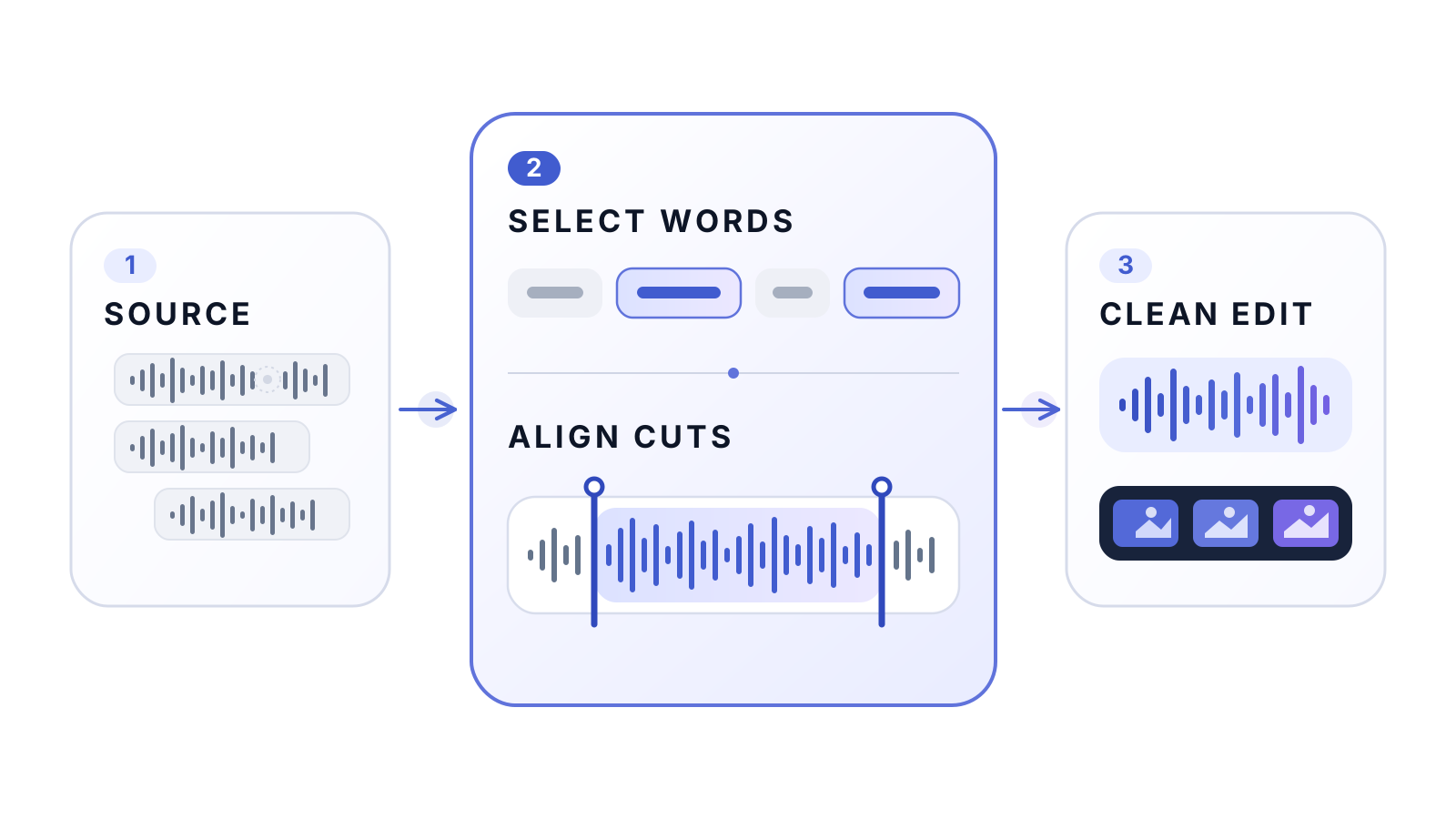
Anyone who records narration knows the pattern: begin a sentence, stumble, stop, say it again, leave a note to yourself, and continue. The final take is in there—but finding it means repeatedly scrubbing through a timeline, comparing near-identical phrases, and cutting around words and breaths by hand.
VoiceCut automates that edit. Give it one audio or video file and it finds false starts, abandoned takes, corrections, repetitions, and recording directions. It keeps the intended source occurrences, resolves safe boundaries around the actual speech, and produces a clean edit beside the original.
It never invents a replacement voice. Every retained word comes from the recording you made.
Hear the difference
The three public examples below were produced by the production VoiceCut pipeline without manual repair. They cover English narration, Russian narration, and narration-driven video editing.
English narration
−28.1%Russian narration
−38.2%Video narration
−21.4%These percentages are duration reductions reported in the published demo manifest, not editing-quality scores. They describe three short demonstrations, not a benchmark over a larger dataset.
English and Russian audio
The English recording contains an abandoned opening and a repeated phrase. VoiceCut keeps the later coherent take. The Russian example exercises Cyrillic grounding and Russian phone alignment, including mixed-script technical terms.
False starts become one clean take
Repeated attempts become one explanation
The same idea works for video
For video, VoiceCut follows the selected speech intervals with direct picture cuts. It does not insert frozen frames or artificial holds to imitate the semantic pauses used for audio-only narration.
All media above is streamed from the VoiceCut project’s own GitHub Pages site; this website does not store duplicate copies.
Why this is not a silence trimmer
A long pause is not necessarily a mistake, and a fluent sentence is not necessarily the take the speaker wants. Someone might say:
“The model has eight layers—no, let me restart—the model has eighteen layers.”
A silence detector can find the gaps, but it cannot understand that the first statement was abandoned. VoiceCut instead works with a chronological transcript in which every occurrence has its own immutable source ID. A semantic planner chooses the exact occurrences that form the intended narration—even when the same words appear several times.
That choice is then checked deterministically. Returned IDs must exist, remain chronological, avoid overlap, match their declared boundary words, and support the claimed sentence. The planner may normalize punctuation or an acoustically plausible transcription error; it cannot add words that were never spoken.
One semantic plan, one final render
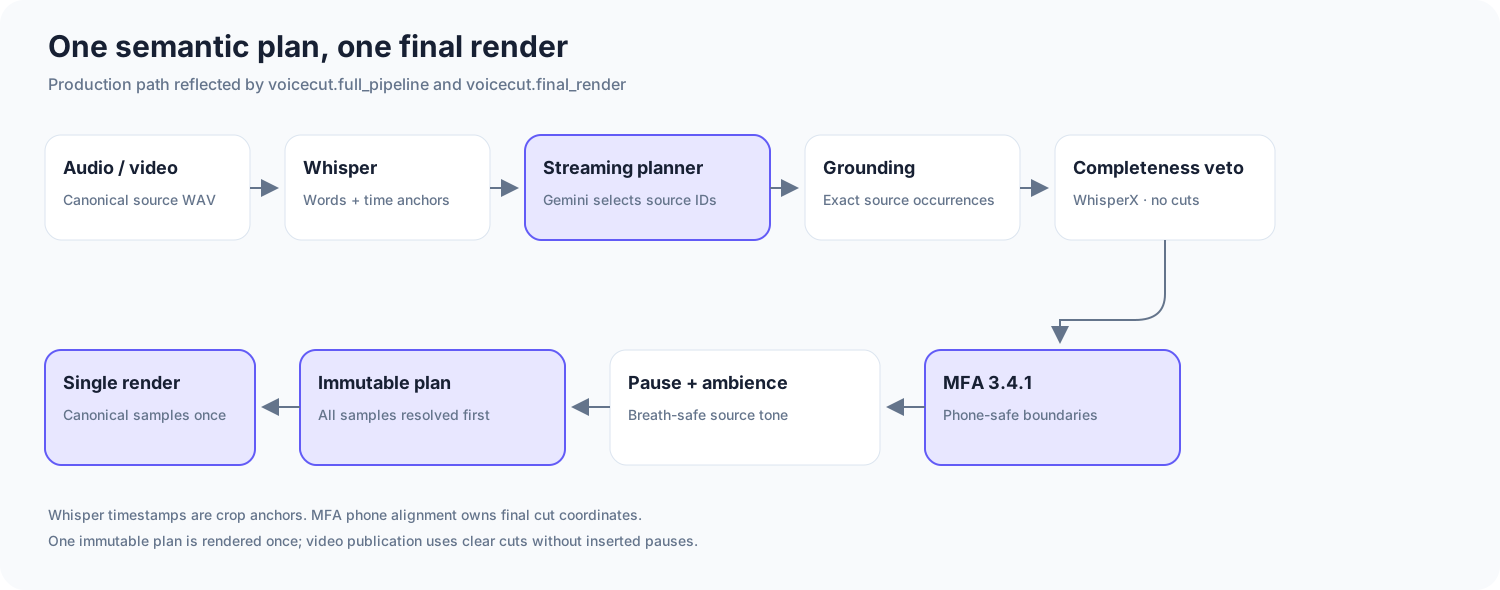
The production path has five broad stages:
- Prepare one canonical source. FFmpeg inspects the real media streams and decodes the speech track into a lossless internal WAV. The signal is not normalized, denoised, or repeatedly re-encoded before analysis.
- Build one chronological transcript. MLX Whisper gives every word occurrence an ID and an approximate time anchor. Repeated words remain distinct, so VoiceCut can choose the later successful attempt.
- Select the intended take. The planner receives transcript text and source IDs, then returns the exact ranges to keep. Long recordings are handled in chronological windows with a one-thought look-ahead, so a sentence is not committed just because it sounds complete before the next retake arrives.
- Prove the cuts are safe. Source grounding checks the semantic plan. WhisperX can veto an incomplete retained word, while Montreal Forced Aligner maps the real source words to phones and owns the final production coordinates.
- Freeze the plan and render once. Every endpoint, pause, protected speech span, and source interval is written into one immutable boundary plan before output samples are produced. The final audio is sliced once from the canonical source; video uses the same selected timeline.
The separation is deliberate: Whisper timestamps are useful crop anchors, but they are not precise enough to own a final splice. A quiet fricative can look like silence in a waveform. VoiceCut only places a production cut outside retained speech phones confirmed by alignment.
Audio should still sound like the room it came from
Removing a failed take also removes the pause around it. VoiceCut classifies transitions as a continuation, short pause, thought break, or section break. Existing natural silence counts toward that target rather than being blindly extended.
For English, optional breath cleanup operates only inside MFA-confirmed non-speech. If VoiceCut needs ambience for a pause or breath replacement, it copies verified clean room tone from the same recording. It cannot replace or fade retained phone samples. Russian defaults to breath cleanup off because the current breath model has not been validated for Russian.
If an alignment cannot support a safe cut, VoiceCut does not quietly fall back to an approximate timestamp. It first asks for another source-grounded selection; if that still fails, it preserves more local context or stops rather than guessing a boundary.
Local media, optional cloud planning
VoiceCut is local-first, but the distinction is precise:
The recording and every physical edit
Media decoding, waveform analysis, transcription, alignment, boundary resolution, breath evidence, ambience selection, and rendering all run locally.
Text and source identifiers
A configured cloud planner sees transcript words, occurrence IDs, thought context, and text-only repair diagnostics. It never receives the source audio or video.
Gemini is the recommended planner today; OpenAI and DeepSeek are supported. Local Qwen, Gemma, and custom MLX-LM planners are available experimentally.
Run it with one command
After installation, the smallest useful invocation is:
voicecut recording.wavThe edit is written beside the input as recording_edited.wav. VoiceCut accepts common audio and video formats through FFmpeg, including WAV, MP3, M4A, FLAC, MOV, and MP4. You can choose an output path, select English or Russian, process video, or retain a work directory containing the transcript, semantic plan, alignment evidence, final boundary plan, and run summary.
Today the supported production setup is an Apple Silicon Mac with Python 3.11 or 3.12. VoiceCut targets one main narrator speaking English or Russian. Video editing is driven by speech timing; it does not understand slide changes, gestures, camera cuts, or visual continuity. The semantic planner can occasionally choose the wrong take, and alignment can still be imperfect around acronyms, technical terms, or tightly connected speech, so every final export should be reviewed.
VoiceCut is beta software, but the design is already useful: choose the right take, ground every word in the source, protect the speech at each boundary, and render only once.
Try the interactive examples, read the complete documentation, or explore and contribute to the open-source repository.